Flipping a footprint to the back layer with pcbnew's Python API
Move a footprint from the front to the back layer of the PCB by script, for a component mounted on B.Cu — with pcbnew or KiCad's IPC API.
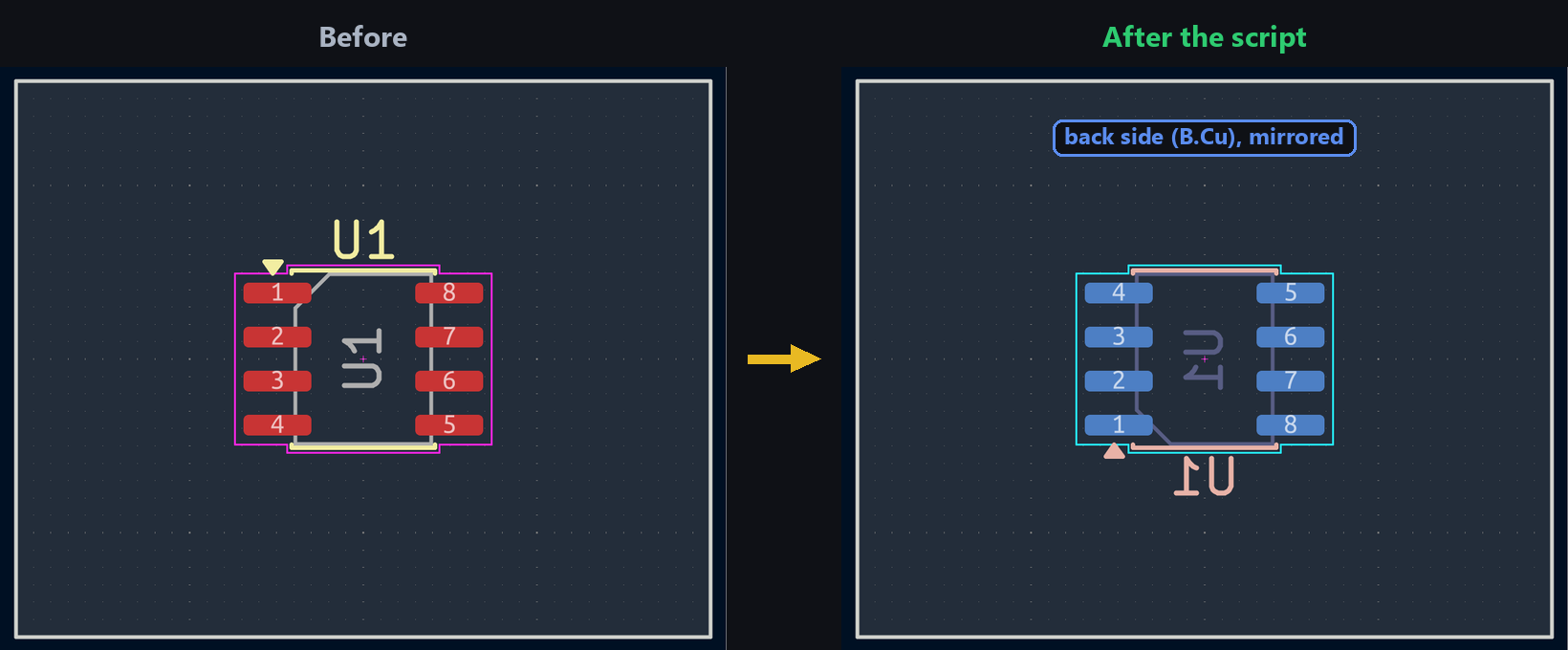
On a double-sided PCB, some components — often small passives — get mounted on the back copper layer to save space up front. Flipping a footprint by script skips the context menu for every component that needs turning over.
Flipping the footprint
Flip mirrors the footprint around a given centre — usually its own position, for an in-place flip:
import pcbnew

board = pcbnew.GetBoard()
fp = board.FindFootprintByReference("U1")
fp.Flip(fp.GetPosition(), True)
board.flip_items does the full flip — layer and geometry (pads, silkscreen mirrored):
from kipy import KiCad

board = KiCad().get_board()
by_ref = {f.reference_field.text.value: f for f in board.get_footprints()}
fp = by_ref["U1"]
board.flip_items(fp)
⚠️ Tested: just changing fp.layer = board.get_layer_by_name("B.Cu") (without going through flip_items) does move the footprint to B.Cu, but doesn’t mirror the pads — their position stays identical, producing a footprint on the wrong side with misaligned pads. kipy’s own documentation confirms this explicitly: “Do not use this property to try to flip an existing footprint to the other side of a board. Use Board.flip_items instead.” flip_items also takes a direction (BoardFlipDirection.BFD_LEFT_RIGHT, the default, or BFD_TOP_BOTTOM).
Try it below: flip the footprint and watch how its orientation and layer color change.
Going further
After a Flip, check that through-hole pads stay aligned and the reference text stays legible — on the back layer, KiCad typically mirrors the text so it still reads correctly once the board is physically turned over.