Fix “ModuleNotFoundError: No module named 'pcbnew'” in KiCad Python
Why import pcbnew fails outside KiCad, and 4 fixes tested on KiCad 10: bundled Python, KiCad Command Prompt, venv, IPC API.
Your script works perfectly in KiCad’s scripting console, but the moment you run it from a terminal or from VS Code, Python stops dead on the very first line:
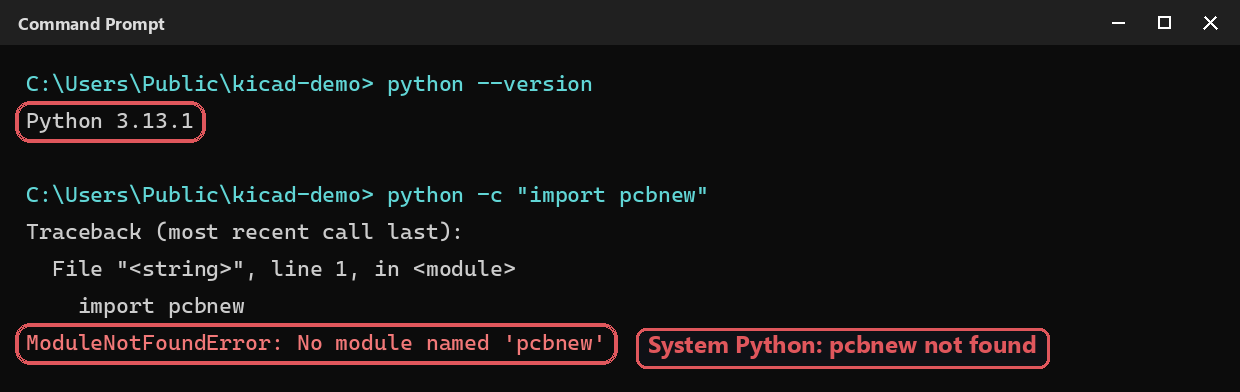
Every fix below was tested on Windows with KiCad 10.0 (bundled Python 3.11.5), using the exact commands shown in the screenshots.
Why import pcbnew fails
pcbnew is not a regular pip package. It’s a native module compiled together with KiCad (a pcbnew.py file plus a compiled _pcbnew library), installed inside KiCad’s own folder — on Windows in C:\Program Files\KiCad\10.0\bin\Lib\site-packages. It is built for one specific Python version: the one KiCad ships with.
Your system Python (here 3.13) doesn’t look in that folder, hence No module named 'pcbnew'. Don’t try pip install pcbnew either: no PyPI package gives you KiCad’s API — the module only comes with a KiCad install.
Fix 1: run the script with the Python bundled with KiCad
The most reliable fix: call KiCad’s own interpreter explicitly.
"C:\Program Files\KiCad\10.0\bin\python.exe" my_script.py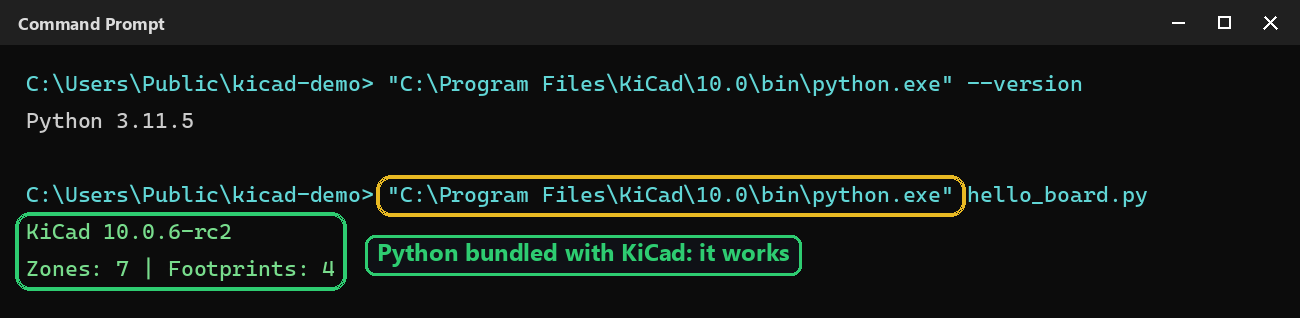
The equivalent interpreter on the other systems (standard install locations — not tested on this machine):
- macOS:
/Applications/KiCad/KiCad.app/Contents/Frameworks/Python.framework/Versions/Current/bin/python3 - Linux: the distribution’s package installs
pcbnewfor the system Python, so use/usr/bin/python3— not a pyenv or Conda Python of another version.
Fix 2 (Windows): open the “KiCad Command Prompt”
KiCad installs a Start menu shortcut named KiCad 10.0 Command Prompt. It opens a terminal where KiCad’s bin folder comes first in the PATH: plain python and pip commands then target KiCad’s install, with nothing to type in full.
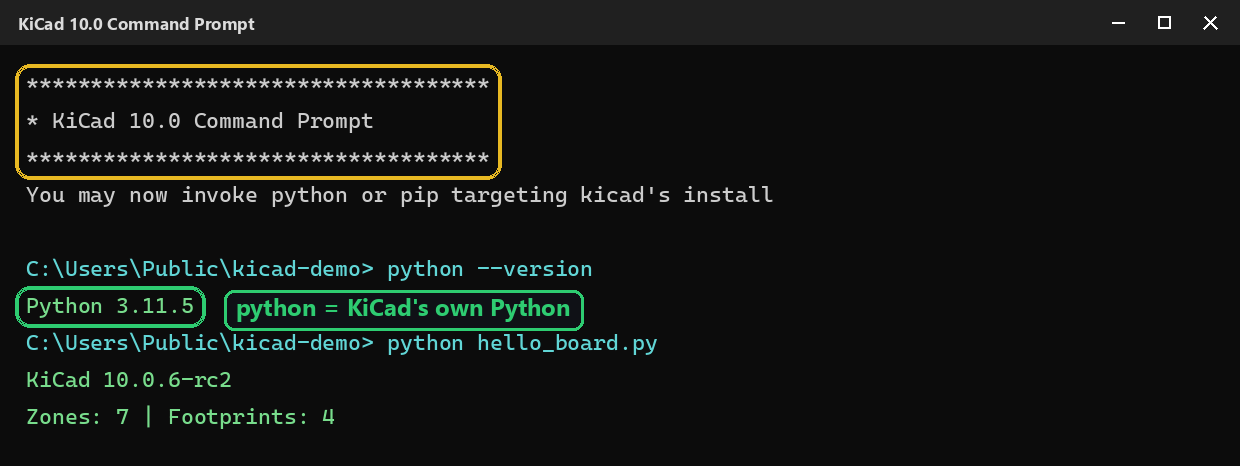
Handy for installing an extra package for your scripts: pip install ... from this prompt installs it for KiCad’s Python, not your system’s.
Pitfall: adding KiCad’s folder to another Python’s sys.path
The tempting shortcut — sys.path.append(r"C:\Program Files\KiCad\10.0\bin\Lib\site-packages") from your usual Python — turns the error into another one:

pcbnew.py is found, but the compiled _pcbnew part only loads in the Python version it was built for. Same Python version as KiCad, or nothing.
Fix 3: a venv that can see pcbnew
You want a virtual environment for your dependencies? Create it from KiCad’s Python with the --system-site-packages option, otherwise the venv is isolated and doesn’t see pcbnew either:
"C:\Program Files\KiCad\10.0\bin\python.exe" -m venv --system-site-packages venv-kicad
venv-kicad\Scripts\python my_script.py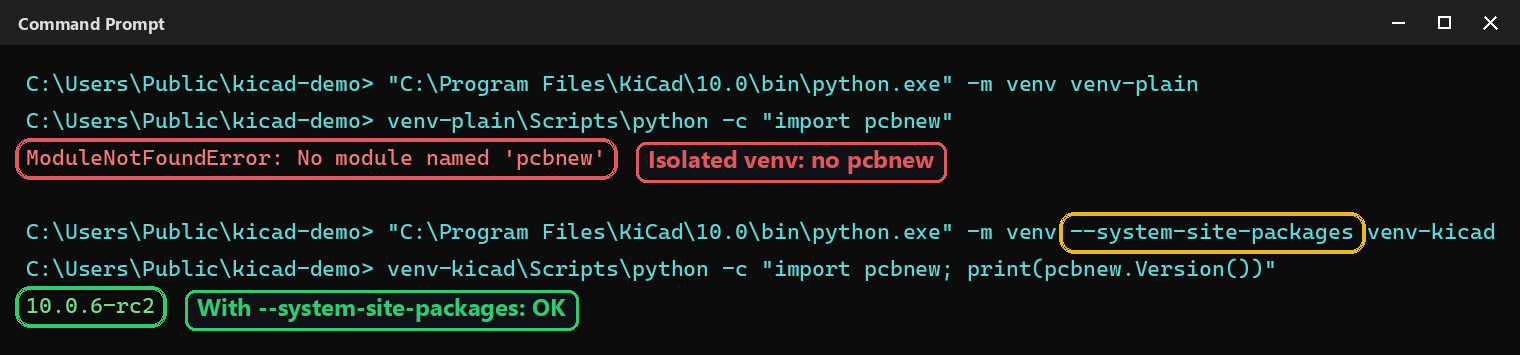
In VS Code, then pick this venv (or KiCad’s python.exe directly) with Python: Select Interpreter so that the Run button and autocompletion use the right interpreter.
Fix 4: switch to the IPC API, which works with any Python
Since KiCad 9, the IPC API offers another route: its Python client, kipy, is a regular pip package (pip install kicad-python) that talks to a running KiCad over a socket. No need for KiCad’s Python — but KiCad has to be open with the API enabled. Setup and the differences with pcbnew are covered in the installation tutorial.
Quick recap
| Situation | Fix |
|---|---|
ModuleNotFoundError in a terminal |
Run the script with C:\Program Files\KiCad\10.0\bin\python.exe |
Windows, python/pip commands |
Open KiCad 10.0 Command Prompt |
DLL load failed while importing _pcbnew |
Wrong Python version: use KiCad’s, don’t patch sys.path |
| Virtual environment | venv --system-site-packages, created from KiCad’s Python |
| You’d rather use your own Python | IPC API (pip install kicad-python) |