Repositioning footprints in bulk from a CSV file with pcbnew's Python API
Read a list of references and coordinates from a CSV file, then reposition every matching footprint in a single script — with pcbnew or KiCad's IPC API.
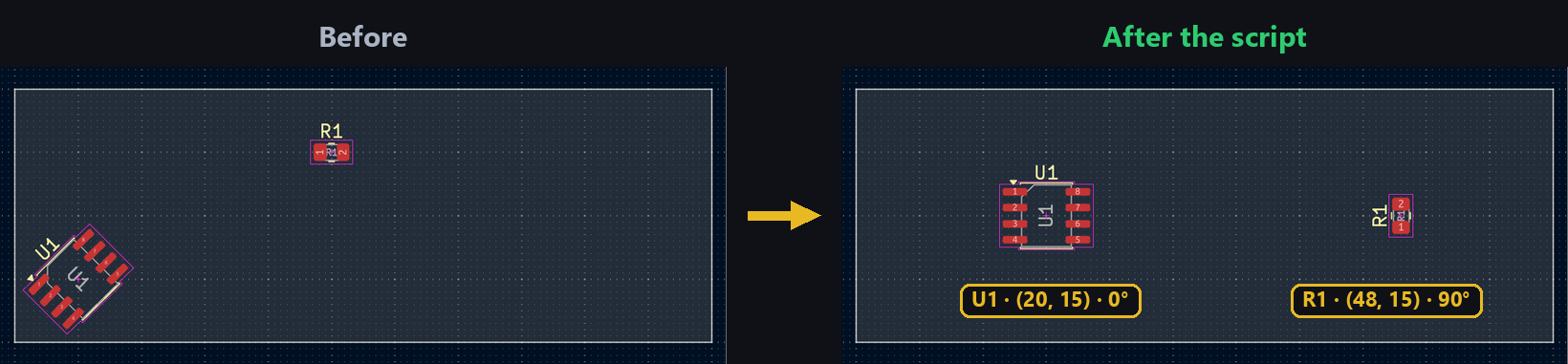
Coming from Eagle or Fusion 360, it’s common to prepare a coordinate table in a spreadsheet and replay it in one shot to reposition every component at once, instead of dragging each one by hand. The same workflow scripts easily in KiCad from a CSV file: reference, X/Y position, and rotation, applied in a single pass.
The CSV format
One row per footprint to reposition, with its reference and position in millimeters:
ref,x_mm,y_mm,rotation_deg
U1,20,15,0
R1,48,15,90
C1,48,30,90
Reading the file
This step is the same regardless of which KiCad API comes next: the standard library’s csv module is enough, nothing extra to install:
import csv

with open("placements.csv") as f:
    rows = list(csv.DictReader(f))
Repositioning each footprint
This script runs fully headless (see the installation tutorial): LoadBoard opens the .kicad_pcb file in memory without launching KiCad, then SaveBoard writes the result back — handy for replaying a full placement in a single command:
import pcbnew

board = pcbnew.LoadBoard("my_board.kicad_pcb")

for row in rows:
    fp = board.FindFootprintByReference(row["ref"])
    if fp is None:
        continue
    fp.SetPosition(pcbnew.VECTOR2I(pcbnew.FromMM(float(row["x_mm"])), pcbnew.FromMM(float(row["y_mm"]))))
    fp.SetOrientationDegrees(float(row["rotation_deg"]))

pcbnew.SaveBoard("my_board.kicad_pcb", board)
The same code works just as well from KiCad’s scripting console: just replace the LoadBoard/SaveBoard lines with board = pcbnew.GetBoard(), as in the footprint placement tutorial.
With the IPC API (the kipy package), changes are grouped into an explicit commit, so the whole batch can be undone at once with Ctrl+Z if the result isn’t right:
from kipy import KiCad
from kipy.geometry import Angle, Vector2

board = KiCad().get_board()
footprints = board.get_footprints()
commit = board.begin_commit()

updated = []
for row in rows:
    fp = next((f for f in footprints if f.reference_field.text.value == row["ref"]), None)
    if fp is None:
        continue
    fp.position = Vector2.from_xy_mm(float(row["x_mm"]), float(row["y_mm"]))
    fp.orientation = Angle.from_degrees(float(row["rotation_deg"]))
    updated.append(fp)

board.update_items(updated)
board.push_commit(commit, "Move footprints via script")
Try it below: change the X/Y position for each reference to see all three footprints move on the board, just like editing rows in the CSV.
Going further
This approach generalizes to any external coordinate source — a panelization tool’s export, another ECAD tool, or a homemade spreadsheet — as long as it produces one reference and one position per row. Add a layer column to the CSV if you also need to flip some footprints to the back side (see the footprint flip tutorial).