Loading a board and inventorying it in one pass with pcbnew's Python API
Load a .kicad_pcb file and list footprints, zones, tracks, vias, text, and nets in a single pass, by script — with pcbnew or KiCad's IPC API.
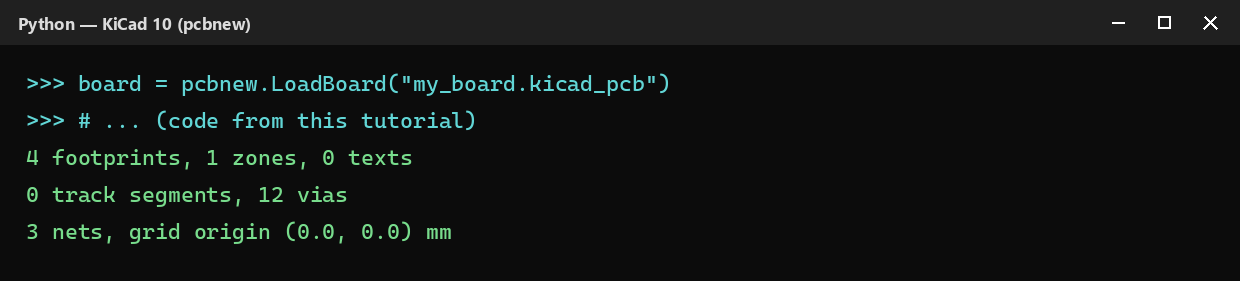
Before writing any script that modifies a board, you often need to read it first: how many footprints, which zones, how many vias, on which nets. It’s the first thing almost every validation, audit, or CI script does — load the file once, then keep lists already sorted by type on hand instead of re-walking the board every time you need a piece of information.
Loading the file
LoadBoard loads a .kicad_pcb file into memory without launching KiCad, exactly like in the installation tutorial:
import pcbnew

board = pcbnew.LoadBoard("my_board.kicad_pcb")
With the IPC API, you connect to an already-open instance — or start a headless one (see the installation tutorial for both methods in detail):
from kipy import KiCad

board = KiCad().get_board()
Listing footprints, zones, and text
Each category of object has its own method on the board:
footprints = board.Footprints()
zones = board.Zones()
texts = [d for d in board.Drawings() if isinstance(d, pcbnew.PCB_TEXT)]

print(f"{len(footprints)} footprints, {len(zones)} zones, {len(texts)} texts")
There’s no dedicated Texts() method: text is part of the generic drawings returned by Drawings() (alongside silkscreen lines, outlines…), hence the filter on PCB_TEXT.
Same idea, with a dedicated method per category — get_text() covers text directly here, no filter needed:
footprints = board.get_footprints()
zones = board.get_zones()
texts = board.get_text()

print(f"{len(footprints)} footprints, {len(zones)} zones, {len(texts)} texts")
Separating tracks from vias
Tracks() returns a mix of tracks (PCB_TRACK) and vias (PCB_VIA, which inherits from PCB_TRACK) — just like in the via audit tutorial, you need to sort with isinstance:
tracks = board.Tracks()
segments = [t for t in tracks if not isinstance(t, pcbnew.PCB_VIA)]
vias = [t for t in tracks if isinstance(t, pcbnew.PCB_VIA)]

print(f"{len(segments)} track segments, {len(vias)} vias")
On the IPC API side, the split is already done: get_tracks() only returns tracks (and track arcs), vias have their own get_vias() method — no isinstance filter needed:
segments = board.get_tracks()
vias = board.get_vias()

print(f"{len(segments)} track segments, {len(vias)} vias")
Listing nets and the grid origin
Nets are retrieved on the board, the grid origin on its design settings:
nets = board.GetNetsByName()
origin = board.GetDesignSettings().GetGridOrigin()

print(f"{len(nets)} nets, grid origin {pcbnew.ToMM(origin)} mm")
Same logic, with get_origin expecting an origin type — BOT_GRID for the grid origin (there’s also BOT_DRILL for the drill/place origin):
from kipy.board import BoardOriginType
from kipy.util.units import to_mm

nets = board.get_nets()
origin = board.get_origin(BoardOriginType.BOT_GRID)

print(f"{len(nets)} nets, grid origin ({to_mm(origin.x)}, {to_mm(origin.y)}) mm")
Going further
This skeleton — load once, keep lists sorted by category on hand — is the basis of any reusable “board wrapper” class: instead of repeating these calls in every script, you group them in the constructor of a small Pcb class, and the rest of the script works on pcb.footprints, pcb.vias, pcb.nets without ever touching board.Footprints() or board.get_footprints() directly again. It’s also the natural starting point for an audit or pre-export validation script (see the via audit tutorial for an example filter applied to a single category).