Adding a layer-change via in the middle of a route with pcbnew's Python API
Move a trace from the front to the back layer through a via placed mid-route, by script — with pcbnew or KiCad's IPC API.
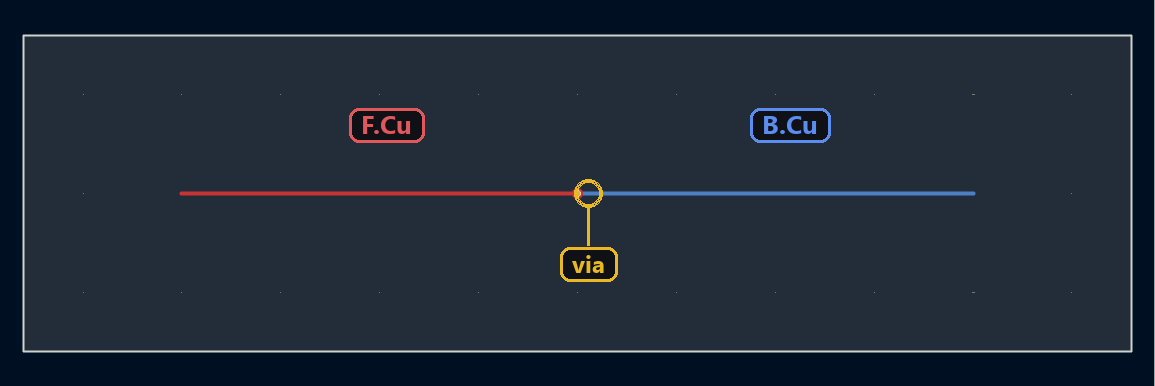
Routing entirely on a single layer isn’t always possible: sometimes you need to cross over to the other side to dodge an obstacle. The transition happens through a via placed exactly where one trace ends and the next begins, on the other layer.
Route, cross over, then continue on the other layer
The via sits at the junction point between the two segments, each on its own layer:
import pcbnew

board = pcbnew.GetBoard()
from pcbnew import PCB_TRACK, PCB_VIA, VECTOR2I, FromMM, F_Cu, B_Cu

track1 = PCB_TRACK(board)
track1.SetStart(VECTOR2I(FromMM(10), FromMM(20)))
track1.SetEnd(VECTOR2I(FromMM(30), FromMM(20)))
track1.SetLayer(F_Cu)
board.Add(track1)

via = PCB_VIA(board)
via.SetPosition(VECTOR2I(FromMM(30), FromMM(20)))
via.SetWidth(via.TopLayer(), FromMM(0.6))
via.SetDrill(FromMM(0.3))
board.Add(via)

track2 = PCB_TRACK(board)
track2.SetStart(VECTOR2I(FromMM(30), FromMM(20)))
track2.SetEnd(VECTOR2I(FromMM(50), FromMM(20)))
track2.SetLayer(B_Cu)
board.Add(track2)
Same structure: two tracks on different layers, connected by a via at their shared point. The via’s diameter and drill size are raw nanometers, converted with from_mm; all three objects are brand new, so they’re created on the board in a single create_items call:
from kipy import KiCad
from kipy.board_types import Track, Via
from kipy.geometry import Vector2
from kipy.util.units import from_mm

board = KiCad().get_board()

track1 = Track()
track1.start = Vector2.from_xy_mm(10, 20)
track1.end = Vector2.from_xy_mm(30, 20)
track1.layer = board.get_layer_by_name("F.Cu")

via = Via()
via.position = Vector2.from_xy_mm(30, 20)
via.diameter = from_mm(0.6)
via.drill_diameter = from_mm(0.3)

track2 = Track()
track2.start = Vector2.from_xy_mm(30, 20)
track2.end = Vector2.from_xy_mm(50, 20)
track2.layer = board.get_layer_by_name("B.Cu")

board.create_items([track1, via, track2])
⚠️ .layer expects a BoardLayer value, not a string: track.layer = "F.Cu" raises a ValueError. get_layer_by_name does the conversion.
Going further
This pattern — trace, via, trace — is the basic building block of any router that needs to alternate between layers to dodge obstacles or balance copper density between the top and bottom of the board.