Duplicating an existing footprint with pcbnew's Python API
Clone an already-placed footprint instead of recreating one from scratch, to quickly reproduce a component with its properties — with pcbnew or KiCad's IPC API.
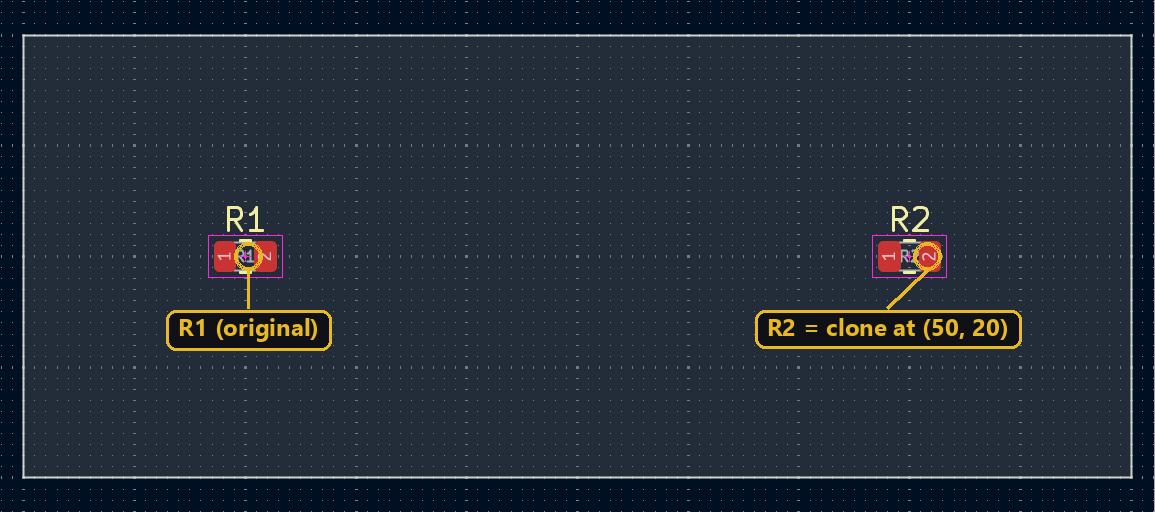
When a footprint is already placed and correctly configured (footprint assignment, properties, symbol link), duplicating it is often faster than recreating one from scratch via FootprintLoad — handy for reproducing a connector or a calibration component in several spots.
Duplicating the footprint
Duplicate clones the object and all its pads; you then give it its own reference and position:
import pcbnew
from pcbnew import VECTOR2I, FromMM

board = pcbnew.GetBoard()
original = board.FindFootprintByReference("R1")
clone = pcbnew.Cast_to_FOOTPRINT(original.Duplicate(False))
clone.SetReference("R2")
clone.SetPosition(VECTOR2I(FromMM(50), FromMM(20)))
board.Add(clone)
⚠️ Duplicate takes an addToParentGroup argument (False if you call board.Add yourself), and returns a generic BOARD_ITEM — Cast_to_FOOTPRINT is required before calling SetReference.
There’s no dedicated duplication method on the IPC API side: clone the Python object with copy.deepcopy, then clear its ID before creating it — otherwise create_items treats it as the original and creates nothing:
import copy
from kipy import KiCad
from kipy.geometry import Vector2

board = KiCad().get_board()
by_ref = {f.reference_field.text.value: f for f in board.get_footprints()}
original = by_ref["R1"]
clone = copy.deepcopy(original)
clone.proto.ClearField("id")
clone.reference_field.text.value = "R2"
clone.position = Vector2.from_xy_mm(50, 20)
board.create_items(clone)
⚠️ Tested: without clone.proto.ClearField("id"), create_items returns something that looks like a success, but nothing shows up on the board — the ID copied from the original makes the server think it’s the same item, not a new one.
Going further
Looping over a list of references and target positions turns Duplicate into the basis of a script that reproduces the same sub-circuit (a calibration footprint, a repeated connector) at several spots on the board without ever reopening the footprint library.
⚠️ KiCad doesn’t forbid two footprints sharing the same reference: if R2 already exists on the board, you now silently have two R2s. Check for a collision before assigning the new reference.