Duplicating and repositioning an existing copper zone with KiCad's Python API
Clone an already-placed copper zone, move it, and rotate it around an arbitrary center without redrawing the outline — with pcbnew or KiCad's IPC API.
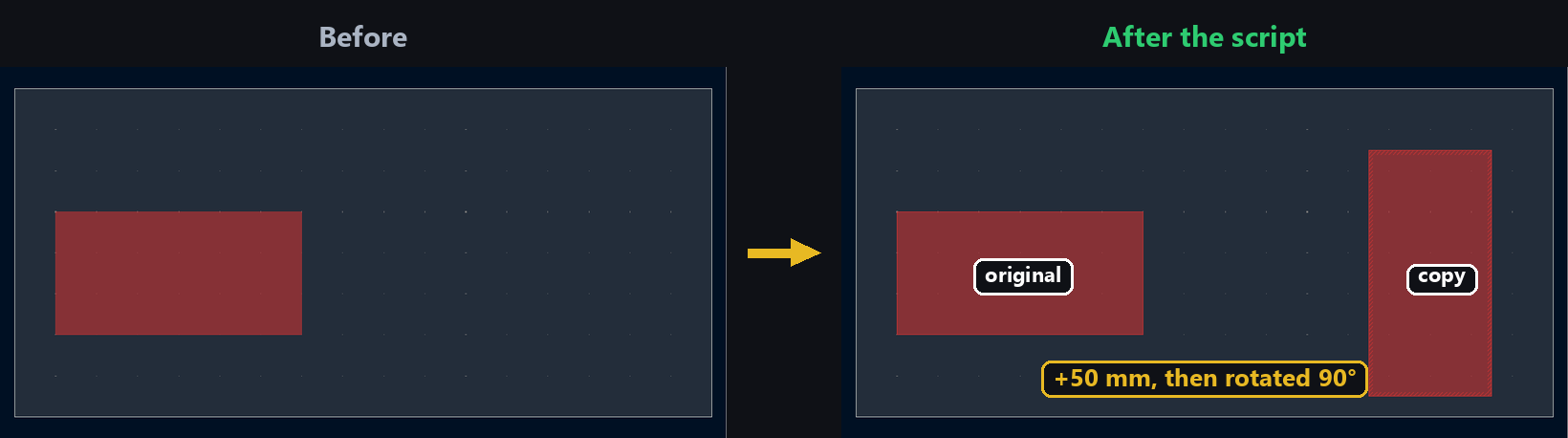
A zone with a complex outline — a ground pour cut around several components, an irregular clearance — quickly becomes tedious to reproduce elsewhere on the board point by point. Just like a footprint, duplicating the existing zone and moving it is faster than rebuilding the outline from scratch, especially for reproducing the same pattern at several spots on a panel.
Duplicating the zone
Duplicate clones the outline and every property of the zone:
import pcbnew
from pcbnew import Cast_to_ZONE

board = pcbnew.GetBoard()
original = list(board.Zones())[0]
clone = Cast_to_ZONE(original.Duplicate(False))
board.Add(clone)
⚠️ Just like FOOTPRINT.Duplicate, addToParentGroup is required (False if you call board.Add yourself), and the return value is a generic BOARD_ITEM — Cast_to_ZONE is needed before calling a ZONE-specific method like Rotate.
Still no dedicated duplication method on the IPC API — same technique as duplicating a footprint: copy.deepcopy then clear the identifier:
import copy
from kipy import KiCad

board = KiCad().get_board()
original = board.get_zones()[0]
clone = copy.deepcopy(original)
clone.proto.ClearField("id")
⚠️ Tested: without clone.proto.ClearField("id"), create_items (called below) returns an object that looks like a created zone, but the zone count on the board doesn’t change — the same trap as duplicating a footprint.
Moving and rotating the copy
Move and Rotate work directly on the duplicated zone, in internal units:
from pcbnew import VECTOR2I, FromMM, EDA_ANGLE, DEGREES_T

clone.Move(VECTOR2I(FromMM(50), FromMM(0)))
center = clone.GetBoundingBox().GetCenter()
clone.Rotate(center, EDA_ANGLE(90, DEGREES_T))
Tested: on an 8-vertex zone moved 50 mm then rotated 90° around the center of its own bounding box, the first vertex moves from (223.52, 138.43) mm to (251.6125, 20.0025) mm — identical after SaveBoard/LoadBoard.
Zone exposes .move and .rotate directly, no need to go through .proto:
from kipy.geometry import Vector2, Angle

clone.move(Vector2.from_xy_mm(50, 0))
bbox = clone.bounding_box()
center = Vector2.from_xy(bbox.pos.x + bbox.size.x // 2, bbox.pos.y + bbox.size.y // 2)
clone.rotate(Angle.from_degrees(90), center)

board.create_items(clone)
Tested with the same values as the pcbnew side (same board, same source zone): first vertex identical down to the nanometer, (251.6125, 20.0025) mm — both APIs use the same rotation convention. Confirmed to survive board.save() and a fresh read of the file.
⚠️ Tested on both APIs: the copy inherits the original zone’s net (GND in our tests). If that’s not what you want, reassign the copy’s net explicitly (clone.SetNet(...) / clone.net = Net(name=...)) before adding it to the board.
A duplicated zone keeps the original’s fill status at the data level, but its filled polygon doesn’t update itself after a Move/Rotate — re-run a fill (see the copper zone tutorial) so the rendering matches the new position.
Going further
This Duplicate/Move/Rotate combination is the same building block used to reposition an existing track, via, or text item — every pcbnew BOARD_ITEM shares these three methods. It’s the core technique behind automatic panelization: duplicate a subset of zones (and tracks, vias, footprints) once, then place it at every position on a panel just by changing the move vector and the rotation angle.