Positioning a footprint with pcbnew's Python API
Learn how to position and rotate a footprint on a PCB by scripting pcbnew's Python API directly, without going through the GUI.
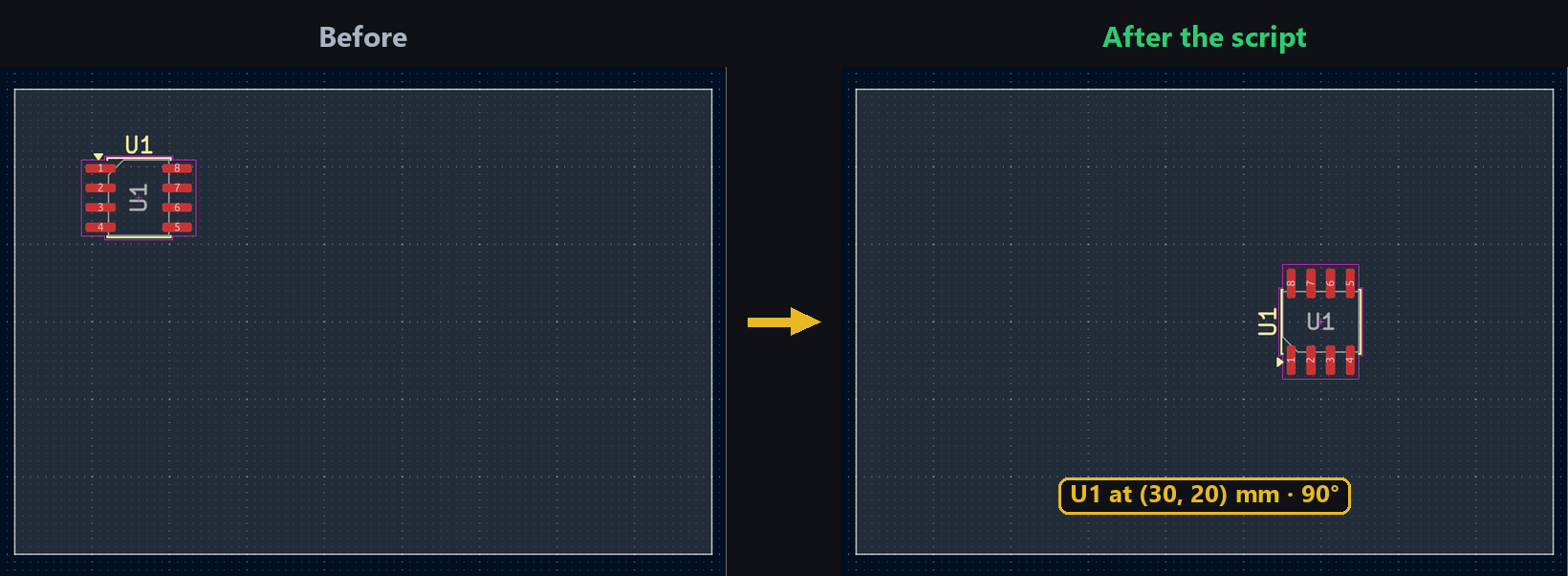
When designing a PCB with dozens of identical components (an LED panel, a grid of connectors), positioning each footprint by hand quickly becomes repetitive and error-prone. KiCad exposes two ways to script this placement: pcbnew, the long-standing Python/C++ binding, and the IPC API, the new scripting interface introduced with KiCad 10/11. Use the switcher above to compare both.
Getting the footprint
With pcbnew, you retrieve the FOOTPRINT object directly from the in-memory board, usually by its reference designator (U1, R4, etc.):
import pcbnew

board = pcbnew.GetBoard()
fp = board.FindFootprintByReference("U1")
With the IPC API, your script is a separate process talking to a running KiCad instance. You fetch the board, then filter its footprints by reference:
from kipy import KiCad

kicad = KiCad()
board = kicad.get_board()
fp = next(f for f in board.get_footprints() if f.reference_field.text.value == "U1")
Setting the position
Position is set with SetPosition, which expects a VECTOR2I object expressed in KiCad’s internal units (nanometers). Most scripts use an mm → internal-units conversion helper to stay readable:
from pcbnew import VECTOR2I, FromMM

fp.SetPosition(VECTOR2I(FromMM(30), FromMM(20)))
The IPC API works directly in real-world units (mm) through a Vector2 class, with no manual conversion. Changes are then pushed back to KiCad explicitly:
from kipy.geometry import Vector2

fp.position = Vector2.from_xy_mm(30, 20)
board.update_items(fp)
Rotating the footprint
Rotation is set separately, in degrees, with SetOrientationDegrees:
fp.SetOrientationDegrees(90)On the IPC API side, orientation is an Angle object, not a plain number: build it with Angle.from_degrees, then sync with the same update_items call:
from kipy.geometry import Angle

fp.orientation = Angle.from_degrees(90)
board.update_items(fp)
Try it below: drag the sliders to see how position and rotation affect the footprint’s placement on the board.
Going further
This approach generalizes easily to a loop over several footprints — handy for placing an entire grid of components in a few lines rather than one click at a time. It’s also the foundation for more advanced layout automation scripts (procedural generation, importing coordinates from an external file, etc.), whether you use pcbnew or the IPC API.