Giving a pad an orientation independent of its footprint with KiCad's Python API
Rotate a single pad without touching the rest of the footprint — and the tested trap that silently loses that setting on one of KiCad's two APIs.
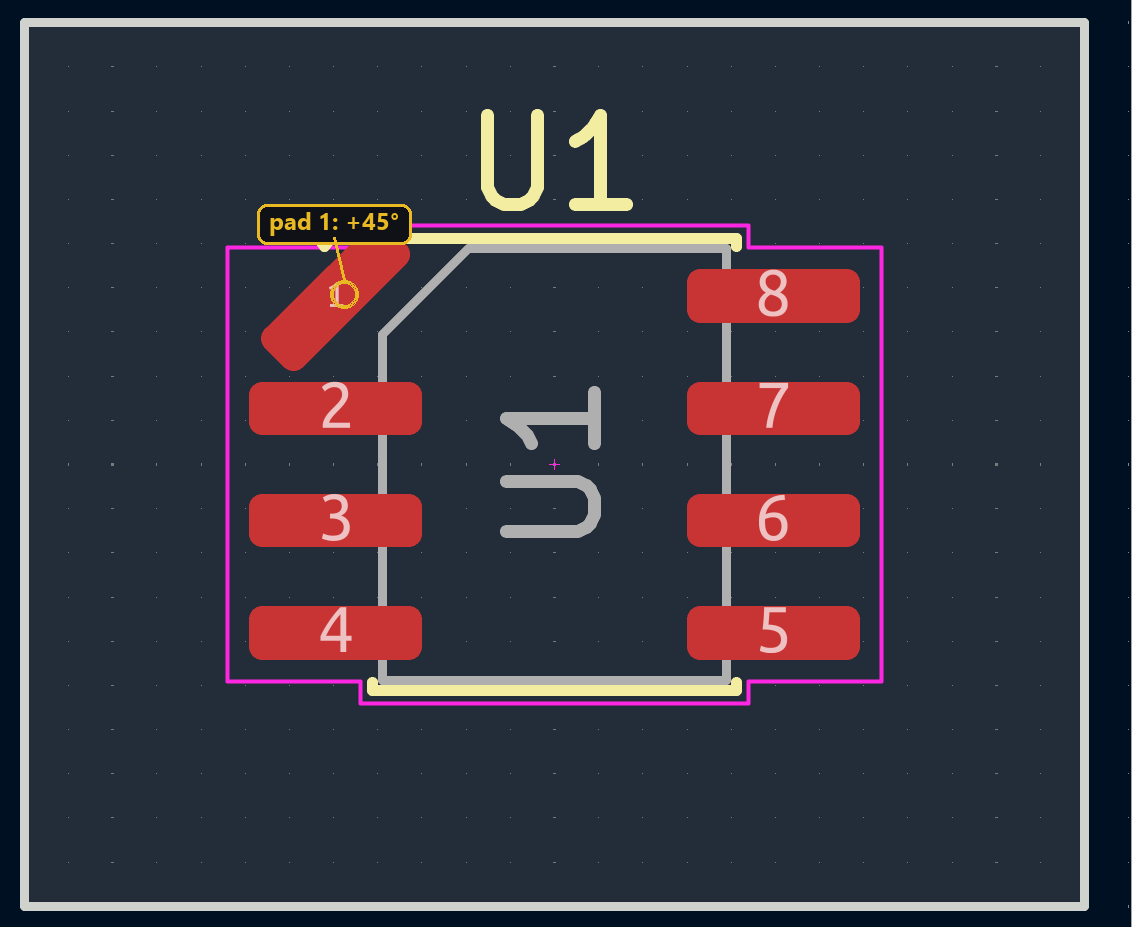
On most footprints, every pad shares the component’s orientation: rotate a connector 90° and all its pins rotate with it. But some pads need to keep their own angle, independent of everything else — an elongated pad that must stay aligned with a specific track, for example. Both APIs report a pad’s angle as an absolute value, not as an offset from the footprint’s own orientation — a distinction with very different consequences on each API once the footprint rotates again.
Reading a pad’s angle
GetOrientationDegrees returns the pad’s absolute angle, footprint included:
import pcbnew

board = pcbnew.GetBoard()
fp = board.FindFootprintByReference("U1")
pad = list(fp.Pads())[0]

print(fp.GetOrientationDegrees(), pad.GetOrientationDegrees())
Tested: rotating fp changes the value returned by pad.GetOrientationDegrees() by the same amount, on every pad of the footprint — the absolute angle automatically tracks the footprint.
Same idea on the IPC side, with padstack.angle:
from kipy import KiCad

kicad = KiCad()
board = kicad.get_board()
fp = next(f for f in board.get_footprints() if f.reference_field.text.value == "U1")
pads = [p for p in board.get_pads() if p.parent and p.parent.value == fp.id.value]

print(fp.orientation.degrees, pads[0].padstack.angle.degrees)
board.get_pads() returns every pad on the board; there’s no dedicated fp.pads method, so filter on p.parent.value == fp.id.value.
Giving a pad a custom angle
For a pad rotated extra degrees beyond the footprint, start from the footprint’s current orientation:
extra = 45
pad.SetOrientationDegrees(fp.GetOrientationDegrees() + extra)
from kipy.geometry import Angle
extra = 45
pad.padstack.angle = Angle.from_degrees(fp.orientation.degrees + extra)
board.update_items(pad)⚠️ Tested trap: rotating the footprint afterward
Once the pad is customized, you often keep working on the footprint — repositioning it, rotating it to line up with a connector. The two APIs react very differently at that point.
Tested on a two-pad footprint: starting orientation -90°, pad manually set to 315° (+45° relative to the footprint). A fp.SetOrientationDegrees(fp.GetOrientationDegrees() + 30) moves the footprint to -60° — and the customized pad automatically follows to 345°, exactly -60+45. The +45° offset is preserved with no manual recomputation; fp.Rotate(center, angle) behaves the same way. pcbnew internally keeps each pad’s angle relative to the footprint — the absolute angle is just a value computed on the fly.
⚠️ Tested on two different footprints (reproduced twice): starting orientation 0°, a pad set to 45° via update_items. A fp.orientation = Angle.from_degrees(30); board.update_items(fp) moves the footprint to 30° — but the customized pad snaps back to exactly 30° (its +45° offset is lost, not just miscalculated), and its position stops moving entirely. The sibling pad, never touched individually, correctly follows the footprint to 30° with its position rotating normally along the arc. A board.save() afterward fixes nothing: the .kicad_pcb file ends up with the frozen pad’s wrong angle and position saved as-is, out of sync with the rest of the footprint.
As soon as a pad receives a custom angle through update_items, it stops tracking the parent footprint’s later rotations. Set the custom angle as the very last step, once the footprint’s final orientation is locked in — or recompute it yourself after every subsequent footprint rotation.
Going further
The same math lets you carry a pad’s angle from a reference footprint over to another one placed at a different base orientation: new_angle = old_pad_angle + (new_footprint_orientation - old_footprint_orientation). It’s identical arithmetic on both APIs since it only involves absolute values — only the behavior at the next footprint rotation differs, as shown above.