Placing a grid of footprints with pcbnew's Python API
Position several identical footprints in a grid by script — useful for an LED panel or a row of connectors — with pcbnew or KiCad's IPC API.
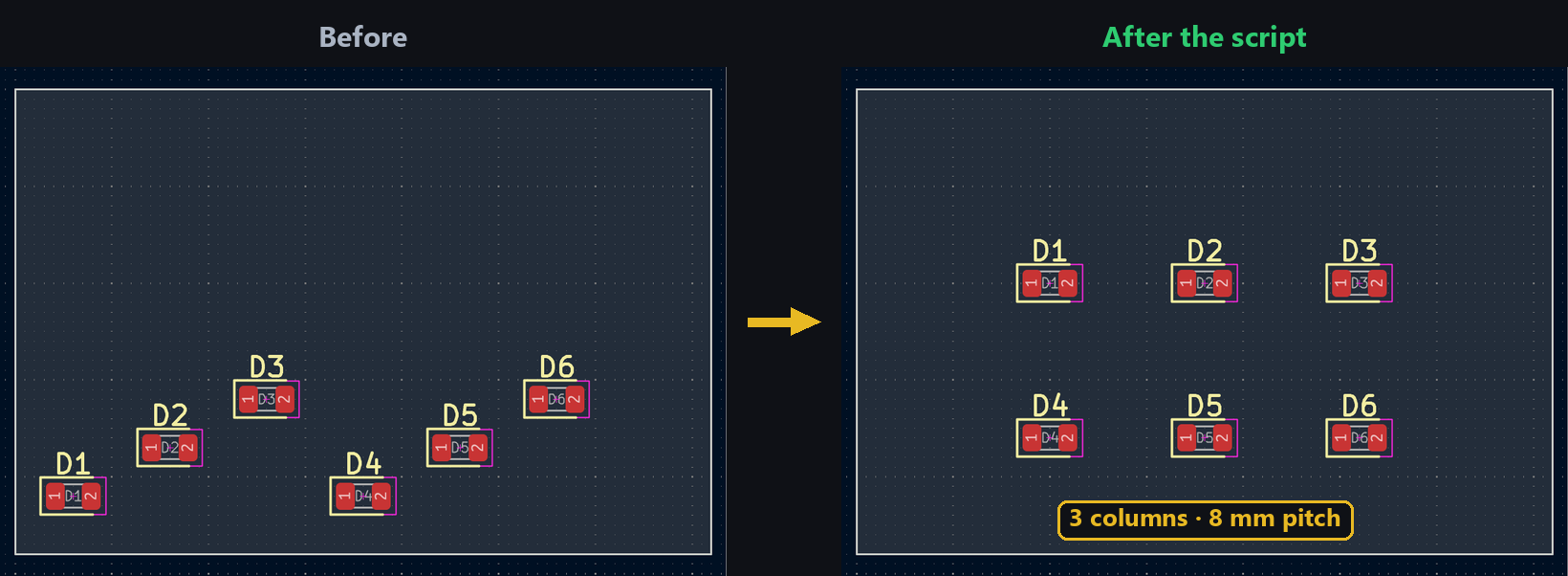
The footprint placement tutorial handles a single component at a time. As soon as you’re dealing with an LED panel or a row of identical connectors, a loop that computes each position from a row count, column count, and spacing replaces dozens of clicks with a few lines of code.
Getting the list of footprints
Fetch each footprint by its reference, in the order they should appear in the grid:
import pcbnew

board = pcbnew.GetBoard()
refs = ["D1", "D2", "D3", "D4", "D5", "D6"]
footprints = [board.FindFootprintByReference(ref) for ref in refs]
With the IPC API, index all footprints by reference first, then rebuild the list in the order you want:
from kipy import KiCad

board = KiCad().get_board()
refs = ["D1", "D2", "D3", "D4", "D5", "D6"]
by_ref = {fp.reference_field.text.value: fp for fp in board.get_footprints()}
footprints = [by_ref[ref] for ref in refs]
Computing each footprint’s position
The loop index i gives the row and column through division and modulo:
from pcbnew import VECTOR2I, FromMM

cols = 3
spacing = 8  # mm
for i, fp in enumerate(footprints):
    x = 20 + (i % cols) * spacing
    y = 20 + (i // cols) * spacing
    fp.SetPosition(VECTOR2I(FromMM(x), FromMM(y)))
Same grid math, with the IPC API working directly in millimeters:
from kipy.geometry import Vector2

cols = 3
spacing = 8  # mm
for i, fp in enumerate(footprints):
    x = 20 + (i % cols) * spacing
    y = 20 + (i // cols) * spacing
    fp.position = Vector2.from_xy_mm(x, y)
    board.update_items(fp)
Try it below: adjust rows, columns, and spacing to see the grid recompute.
Going further
The same principle combines nicely with a stitching-via grid around the panel, or generalizes to a circular layout by swapping the x, y math for a position on a circle instead of a grid.